Article
Claude: Three Surfaces To Work With
Chat vs. Cowork vs. Design: The Three Ways to Work With Claude in CRE
Most commercial real estate teams I train are using one Claude and calling it "Claude." They open the same chat box for everything — a quick question about a co-tenancy clause, a 40-lease CAM reconciliation project, and an investor deck — and then wonder why the answers feel uneven and why they hit their usage limit on a Tuesday.
The issue usually isn't the prompt. It's that they're using the wrong surface. This is Claude Part 2.
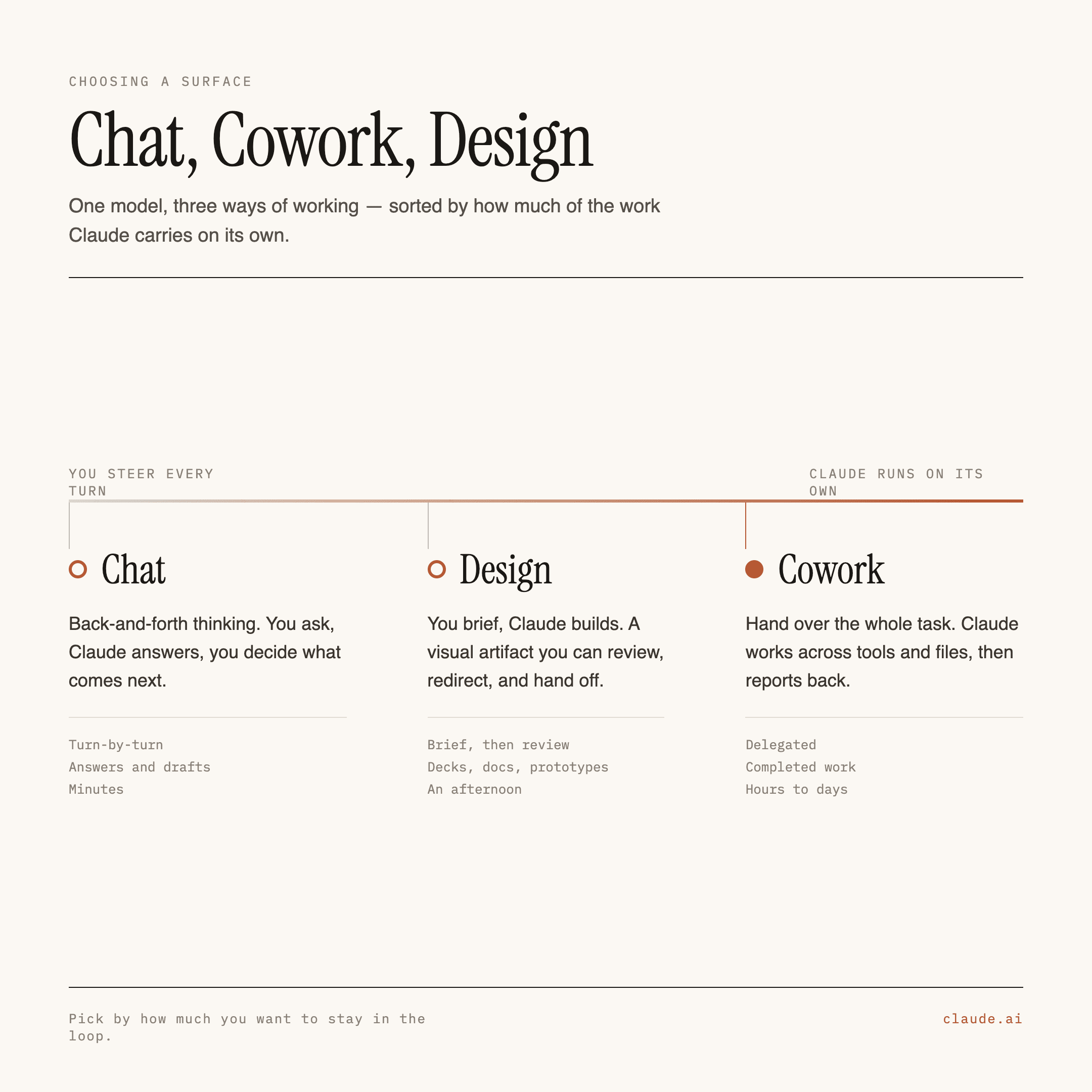
Claude now has three distinct ways to work: Chat, Cowork, and Design. They share a model and a usage pool, but they are built for different shapes of work and they hand you different things at the end. Knowing which one to open is the highest-leverage skill a CRE team can possess right now.
Here's how to think about it.
The one-line version
Chat is for thinking. You ask, it answers. Output is a message.
Cowork is for doing. You describe an outcome, it executes multi-step work and hands you finished files.
Design is for showing. You describe something visual, it produces polished screens, decks, and prototypes.
Chat: the fast lane
Chat is the surface everyone knows. One prompt, one response, conversation memory, artifacts if you ask for them.
What you actually get out of it: text in the conversation. Answers, drafts, summaries, explanations, a rewritten paragraph, a lease clause explained in plain English. If you ask, it will produce an artifact — a markdown doc, a self-contained HTML page, a chart — that you can preview and download. Skills and connectors work here too, so Chat can reach into Google Drive or SharePoint and read a document before answering.
What CRE people should use it for:
"Explain what a right of first offer does to my exit timeline."
"Rewrite this LOI cover email so it's shorter and less defensive."
"What's a reasonable CAM admin fee for a grocery-anchored center in this market?"
Pressure-testing your own thinking before a call.
Sanity-checking a single clause against a single position.
What it's bad at: anything with more than three steps, anything spanning many files, anything where you want the deliverable rather than a description of the deliverable. If you find yourself copying Claude's output into Excel and reformatting it by hand, you were in the wrong surface.
Cost profile: the cheapest of the three. A Chat exchange is a handful of turns. You can do a lot of Chat before you feel it.
Design: the visual lane
Claude Design launched out of Anthropic Labs in April 2026 and is the least-known of the three among CRE teams — which is a shame, because our industry is unusually visual. Every mandate we chase gets decided partly on how the material looks.
Design is a canvas, not a chat box. You describe what you want, Claude generates it visually, and you can drag, resize, and edit directly on the canvas instead of re-prompting your way to a layout.
What you actually get out of it:
Polished screens, one-pagers, and pitch decks
Working prototypes — code-powered, so they can include motion, video, 3D, and real interaction, not just static frames
Marketing collateral and landing pages
Exports to PDF, PPTX, Canva, standalone HTML, or a shareable internal URL
Canva can be the most tricky of all - you end up wasting a few turn getting the composition and graphics to land fully aligned
First, design system import: you can point Design at your brand's colors, type, and spacing (from a repo or files) so it stops producing generic AI-looking output and starts producing your output. For a brokerage with a real brand book, this is the difference between usable and embarrassing. Second, /design-sync, which pushes and pulls between Design and Claude Code — relevant if your firm is actually building a tenant portal or a deal-tracking app.
CRE use cases that land:
Landlord listing presentations and new-business pitch decks
Tenant-facing marketing flyers and site-tour one-pagers
An investment committee deck where the charts need to look intentional
An interactive property microsite you can send instead of a PDF
Quick visual explorations of window signs, standees, event kiosks before you commission a real designer
What it's bad at: analysis. Design makes things look right; it does not want to be your abstraction engine or your variance report. Don't ask it to format a rent roll.
Cost profile: middling to heavy, depending on iteration. Visual generation with lots of revisions adds up faster than Chat.
Cowork: the harness
This is the one worth understanding properly, because Cowork isn't really "a chat with more features." It's a harness — an environment where Claude gets a computer, a filesystem, tools, memory of your setup, and permission to work for a long time without checking in on every step.
The mental shift: in Chat you supply the steps. In Cowork you supply the outcome.
What you actually get out of it: files. Real ones.
.xlsxwith working formulas — a rent roll rollup, a variance model, a comp set.docx— lease abstracts, IC memos, redlined agreements with tracked changes and margin comments.pptx— decks built from your actual dataSelf-contained HTML dashboards and reports you can open in a browser or drop into a page
Reorganized folders, renamed files, extracted data, structured JSON records
Research synthesized across dozens of sources into one document
Cowork runs in an isolated cloud environment on Anthropic's servers, so the session keeps going even when your laptop is asleep. If you want it touching files on your actual machine, you keep the desktop app open and connect a folder.
What makes it a harness: four building blocks
Skills. A skill is a folder of instructions that teaches Claude how your firm does a specific job. Not "analyze this rent roll" generically — abstract it NOI template, flag assumptions, and it can write both an excel file and a JSON record to the portfolio folder to use with downstream skills. Once a skill exists, the workflow is repeatable by anyone on the team at the same quality. This is where institutional knowledge stops living in one senior analyst's head.
Connectors. These plug Claude into where your data actually lives — Google Workspace, Microsoft 365 and SharePoint, Box, Slack, DocuSign, and a growing registry of others. In practice this means Claude can pull the executed lease from SharePoint, read the broker's email thread in Outlook, and write the abstract back to the right folder, without you playing courier.
Plugins. A plugin bundles all of the above — skills, connectors, slash commands, sub-agents, hooks — into one installable package, so a new hire gets the whole configured setup from their first conversation instead of a blank box. Anthropic open-sourced a set of role-based plugins (legal, finance, marketing, data, sales, and more), and you can build and distribute your own. For CRE, the interesting move is a firm-specific plugin: your playbooks, your file structure, your templates, your deal-killer checklist. Note that hooks and sub-agents only run in Cowork — install a plugin in web chat and those pieces sit greyed out.
On top of that, Cowork can schedule tasks: a Monday-morning delinquency report, a quarterly clause sweep, a weekly pipeline digest, generated in the cloud whether or not you're online.
CRE use cases that land:
Portfolio analysis
Running a lease against a playbook and producing tracked-change redlines with rationale comments
Monthly property performance reports with T-12 trends and budget variance
Cross-lease clause reports — "who can terminate," "which uses are blocked," "which options expire this year"
Post-close onboarding checklists and TI coordination trackers
Cleaning up the shared drive that nobody has touched since 2019
Cost profile: the heaviest by a wide margin, and this surprises people.
The usage question, honestly
All three surfaces draw from one shared usage pool — the same rolling window and weekly budget that Chat and Claude Code use. There is no separate Cowork allowance.
Cowork burns through it much faster because it's doing far more per request: reading files, calling tools, reasoning across steps, spawning sub-agents, iterating toward a finished artifact. One Cowork task can consume what dozens of chat messages would.
How to manage it:
Match the surface to the job. A question is a Chat question. Don't open Cowork to ask what a SNDA is.
Scope tightly. "Abstract these 12 leases into the standard field set" costs less than "look at the portfolio folder and do something useful."
Don't re-upload the same files across sessions.
Batch related work into one Cowork run rather than five sprawling ones.
Check Settings → Usage before and after anything large, until you have a feel for it.
Choosing, in practice
Ask yourself one question: what do I want to be holding when this is finished?
A better understanding, or a paragraph → Chat
Something that has to look good in front of a client → Design
A file, a folder, or a report you'd otherwise pay someone a day to produce → Cowork
And the sequencing that works best: think in Chat, execute in Cowork, present in Design. Figure out what you want and pressure-test the logic in a cheap Chat conversation. Hand the settled scope to Cowork to actually produce the data and documents. Take the output into Design when it needs to face a landlord, a tenant, or an IC.
Best practices that transfer across all three
Give context before instructions. Who you are, what the asset is, who the audience is, what the constraint is. CRE work is context-dense and Claude cannot infer that this is a 2nd-gen box in a secondary market with a co-tenancy problem.
Ask for the format explicitly. "As an xlsx with a summary tab" gets you a different result than "give me the numbers."
Turn anything you've done three times into a skill. If you've prompted your way to the same deck format three times, that's a skill, and it should live in a plugin your whole team installs.
Connect the source, don't paste the source. Connectors exist so people stop uploading or pasting documents into a chat box. Pasting loses formatting, loses page references, and burns tokens.
Verify the numbers. Claude is good at CRE work and it is not infallible. Every output should get spot-checked against the document; every model gets its formulas inspected. Treat output as a very fast first-year analyst — enormously useful, always reviewed.
Start narrow. The teams that succeed with Cowork pick one painful, repetitive, well-defined workflow and nail it. The teams that struggle try to automate "leasing."
The three surfaces aren't tiers of the same product — they're different tools that happen to share a brain. Once your team stops treating every request as a chat message, the ceiling on what Claude can do for a CRE shop moves a long way up.
If you want help mapping your own workflows to the right surface — or building the plugin that encodes how your firm actually works — that's most of what I do.